
 打赏
打赏
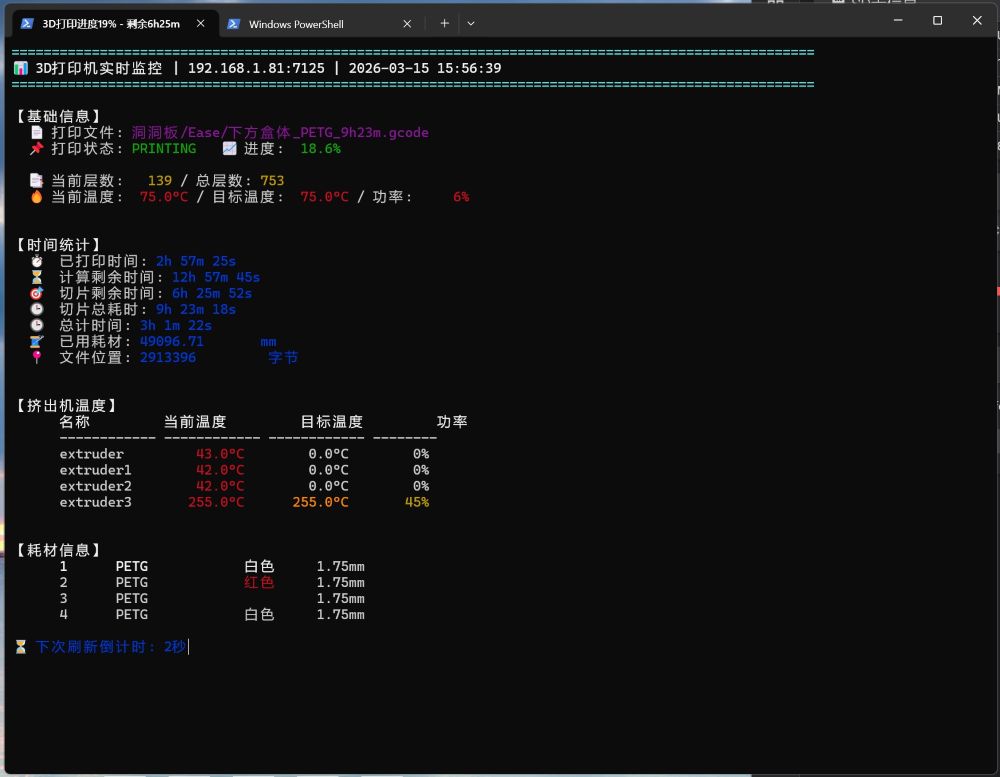
以下代码在命令行获取Snapmaker U1打印机(Klipper系统)的实时打印信息
#
# 实时显示U1打印机信息
# 2026.3.15
# https://i.scwy.net
# Ease
#
import asyncio
import websockets
import json
import aiohttp
from datetime import datetime, timedelta
import sys
import os
import subprocess
# ===================== 打印机配置 =====================
MOONRAKER_IP = "192.168.1.81"
MOONRAKER_PORT = 7125
MOONRAKER_WS_URL = f"ws://{MOONRAKER_IP}:{MOONRAKER_PORT}/websocket"
QUERY_INTERVAL = 5 # 基础刷新间隔(秒)
MATERIAL_REFRESH_INTERVAL = 12 # 材料数据刷新间隔(单位:基础刷新次数)
TIMEOUT = 10
# 支持4个挤出机配置
EXTRUDERS = ["extruder", "extruder1", "extruder2", "extruder3"]
# ======================================================
# ========== 美化相关配置 ==========
class Colors:
"""终端颜色配置(仅Windows PowerShell/CMD支持)"""
RESET = "\033[0m"
RED = "\033[31m"
GREEN = "\033[32m"
YELLOW = "\033[33m"
BLUE = "\033[34m"
PURPLE = "\033[35m"
CYAN = "\033[36m"
WHITE = "\033[37m"
BOLD = "\033[1m"
UNDERLINE = "\033[4m"
# 兼容Windows终端颜色
if sys.platform.startswith('win'):
# 启用Windows终端ANSI颜色支持
os.system('')
def init_console():
"""初始化控制台(新增PowerShell标题初始化)"""
if sys.platform.startswith('win'):
import io
sys.stdout = io.TextIOWrapper(sys.stdout.buffer, encoding='utf-8', line_buffering=True)
os.system('cls')
# 初始化PowerShell标题
set_powershell_title("3D打印机监控 - 初始化中...")
else:
sys.stdout.reconfigure(line_buffering=True) if hasattr(sys.stdout, 'reconfigure') else None
os.system('clear')
def set_powershell_title(title):
"""
设置PowerShell窗口标题(仅Windows生效)
:param title: 标题文本
"""
if not sys.platform.startswith('win'):
return
# 限制标题最大长度(PowerShell建议不超过80字符)
MAX_TITLE_LENGTH = 80
if len(title) > MAX_TITLE_LENGTH:
title = title[:MAX_TITLE_LENGTH - 3] + "..."
try:
# 方法1:通过PowerShell命令设置标题(使用转义处理)
# 替换单引号为双引号避免语法错误
escaped_title = title.replace("'", "\"")
subprocess.run(
["powershell", "-Command", f"$Host.UI.RawUI.WindowTitle = '{escaped_title}'"],
capture_output=True,
encoding='utf-8',
timeout=1
)
except Exception:
try:
# 备用方法:通过cmd title命令(更稳定)
# cmd title命令不支持特殊字符,简化处理
simple_title = title.replace("|", "-").replace(":", "=")
os.system(f"title {simple_title}")
except:
pass
def safe_get(data, keys, default=None):
"""安全获取嵌套字典值"""
if not isinstance(data, dict):
return default
current = data
for key in keys:
if isinstance(current, dict) and key in current:
current = current[key]
else:
return default
return current if current is not None else default
def safe_float(value, default=0.0):
"""安全转换为浮点数"""
try:
return float(value) if value is not None else default
except:
return default
def safe_int(value, default=0):
"""安全转换为整数"""
try:
return int(value) if value is not None and value != "" else default
except:
return default
def format_seconds_short(seconds):
"""精简版时间格式化(适配标题显示:7h19m)"""
sec = safe_float(seconds)
if sec <= 0:
return "未知"
hours = int(sec // 3600)
mins = int((sec % 3600) // 60)
parts = []
if hours > 0:
parts.append(f"{hours}h")
parts.append(f"{mins}m")
return "".join(parts)
def format_seconds(seconds):
"""完整时间格式化(界面显示:7h 19m 47s)"""
sec = safe_float(seconds)
if sec <= 0:
return "未知"
hours = int(sec // 3600)
mins = int((sec % 3600) // 60)
secs = int(sec % 60)
parts = []
if hours > 0:
parts.append(f"{hours}h")
if mins > 0 or hours > 0: # 有小时就显示分钟
parts.append(f"{mins}m")
parts.append(f"{secs}s")
return " ".join(parts)
def calculate_remaining_time(print_duration, progress):
"""
计算剩余时间
:param print_duration: 已打印时间(秒)
:param progress: 打印进度(百分比)
:return: 剩余时间(秒)
"""
if progress <= 0 or print_duration <= 0:
return 0
# 总预计时间 = 已打印时间 / 进度
total_estimated = print_duration / (progress / 100)
# 剩余时间 = 总预计时间 - 已打印时间
remaining = total_estimated - print_duration
return max(0, remaining)
def get_status_color(print_state):
"""根据打印状态返回对应颜色"""
state_map = {
"printing": Colors.GREEN, # 打印中 - 绿色
"paused": Colors.YELLOW, # 暂停 - 黄色
"standby": Colors.BLUE, # 待机 - 蓝色
"error": Colors.RED, # 错误 - 红色
"complete": Colors.PURPLE # 完成 - 紫色
}
return state_map.get(print_state.lower(), Colors.WHITE)
# ========== 料盘数据获取函数(独立封装) ==========
async def get_filament_info():
"""获取料盘(材料)数据"""
try:
async with websockets.connect(MOONRAKER_WS_URL, ping_interval=5) as ws:
# 查询所有关键数据(你的原始请求)
req = json.dumps({
"jsonrpc": "2.0",
"method": "printer.objects.query",
"params": {
"objects": {
"print_task_config": None, # 颜色数据所在
}
},
"id": 1
})
await ws.send(req)
while True:
msg = await ws.recv()
data = json.loads(msg)
if data.get("id") == 1 and "result" in data:
status = data["result"]["status"]
# 读取 print_task_config 里的颜色数据(你的代码)
task_config = status.get("print_task_config", {})
rgba_list = task_config.get("filament_color_rgba", ["未知"]*4)
filament_type = task_config.get("filament_type", ["未知"]*4)
# 转换为中文颜色名称(你的代码)
def rgba_hex_to_color_name(rgba_hex):
"""把RGBA十六进制(如FFFFFFFF)转成中文颜色名称"""
# 只取前6位RGB(忽略最后2位A)
rgb_hex = rgba_hex[:6].upper() if rgba_hex != "未知" else "未知"
# 常见颜色映射(可根据你的实际颜色扩展)
color_map = {
"FFFFFF": "白色",
"000000": "黑色",
"FF0000": "红色",
"00FF00": "绿色",
"0000FF": "蓝色",
"FFFF00": "黄色",
"FF00FF": "紫色",
"00FFFF": "青色",
"DE1619": "红色",
"808080": "灰色",
"FFA500": "橙色"
}
# 匹配预设颜色,匹配不到则显示原始值
return color_map.get(rgb_hex, f"#{rgb_hex}")
colors = [rgba_hex_to_color_name(rgba) for rgba in rgba_list]
# 整理4卷耗材信息
multi_filament = []
for i in range(4):
multi_filament.append({
"index": i+1,
"type": filament_type[i] if i < len(filament_type) else "未配置",
"color": colors[i] if i < len(colors) else "未配置",
"diameter": "1.75mm"
})
return {
"multi_filament": multi_filament,
"filament_type": filament_type,
"colors": colors
}
except Exception as e:
print(f"{Colors.RED}⚠️ 获取料盘数据异常: {type(e).__name__} - {e}{Colors.RESET}")
# 返回默认值
return {
"multi_filament": [
{"index":1, "type":"未配置", "color":"未配置", "diameter":"1.75mm"},
{"index":2, "type":"未配置", "color":"未配置", "diameter":"1.75mm"},
{"index":3, "type":"未配置", "color":"未配置", "diameter":"1.75mm"},
{"index":4, "type":"未配置", "color":"未配置", "diameter":"1.75mm"}
],
"filament_type": ["未配置"]*4,
"colors": ["未配置"]*4
}
async def get_file_metadata(filename):
"""获取打印文件的详细元数据(包含切片预估时间)"""
if not filename or filename == "无":
return {}
try:
async with aiohttp.ClientSession(timeout=aiohttp.ClientTimeout(total=TIMEOUT)) as session:
# 获取文件详细信息(包含切片时的预估时间)
url = f"http://{MOONRAKER_IP}:{MOONRAKER_PORT}/server/files/metadata?filename={filename}"
async with session.get(url) as resp:
if resp.status == 200:
return await resp.json()
else:
print(f"{Colors.YELLOW}⚠️ 获取文件元数据失败,状态码: {resp.status}{Colors.RESET}")
return {}
except Exception as e:
print(f"{Colors.RED}⚠️ 获取文件元数据异常: {str(e)}{Colors.RESET}")
return {}
async def get_full_printer_data():
"""获取完整的打印机数据(新增print_stats.estimated_time字段)"""
# 请求所有需要的字段(新增estimated_time获取)
url = (
f"http://{MOONRAKER_IP}:{MOONRAKER_PORT}/printer/objects/query?"
"print_stats=filename,state,print_duration,total_duration,filament_used,estimated_time&" # 新增estimated_time
"virtual_sdcard=progress,remaining_time,file_position,metadata,estimated_time&" # 新增estimated_time
"gcode_move=current_layer,position,extruder,absolute_coordinates&"
"heater_bed=temperature,target,power&"
"extruder=temperature,target,power&"
"extruder1=temperature,target,power&"
"extruder2=temperature,target,power&"
"extruder3=temperature,target,power&"
"filament_switch_sensor=enabled&"
"configfile=settings&"
"layer_display=current_layer,total_layers" # 添加layer_display支持
)
try:
async with aiohttp.ClientSession(timeout=aiohttp.ClientTimeout(total=TIMEOUT)) as session:
async with session.get(url) as resp:
if resp.status == 200:
return await resp.json()
else:
print(f"{Colors.YELLOW}⚠️ 获取打印机数据失败,状态码: {resp.status}{Colors.RESET}")
return {}
except Exception as e:
print(f"{Colors.RED}⚠️ 获取打印机数据异常: {str(e)}{Colors.RESET}")
return {}
async def main():
"""主程序:显示完整的打印机数据(材料数据间隔刷新)"""
init_console()
print(f"{Colors.BOLD}{Colors.CYAN}{'='*100}{Colors.RESET}")
print(f"{Colors.BOLD}{Colors.CYAN}📡 3D打印机监控系统 v1.0 | 连接地址: {MOONRAKER_IP}:{MOONRAKER_PORT}{Colors.RESET}")
print(f"{Colors.BOLD}{Colors.CYAN}{'='*100}{Colors.RESET}")
# 初始化变量
refresh_counter = 0 # 刷新计数器
filament_info = None # 料盘数据缓存
# 首次启动强制获取料盘数据
print(f"\n{Colors.BLUE}🔄 首次获取料盘数据...{Colors.RESET}")
filament_info = await get_filament_info()
print(f"{Colors.GREEN}✅ 料盘数据初始化完成{Colors.RESET}")
while True:
# ========== 1. 料盘数据间隔刷新逻辑 ==========
refresh_counter += 1
# 每MATERIAL_REFRESH_INTERVAL次刷新才获取一次料盘数据
if refresh_counter >= MATERIAL_REFRESH_INTERVAL:
print(f"\n{Colors.BLUE}🔄 达到{MATERIAL_REFRESH_INTERVAL}次刷新,更新料盘数据...{Colors.RESET}")
filament_info = await get_filament_info()
refresh_counter = 0 # 重置计数器
print(f"{Colors.GREEN}✅ 料盘数据更新完成{Colors.RESET}")
# ========== 2. 实时获取核心数据(进度、时间等) ==========
printer_data_task = asyncio.create_task(get_full_printer_data())
data = await printer_data_task
status = safe_get(data, ["result", "status"], {})
current_time = datetime.now().strftime("%Y-%m-%d %H:%M:%S")
# 基础打印信息
print_stats = safe_get(status, ["print_stats"], {})
print_state = safe_get(print_stats, ["state"], "standby")
print_file = safe_get(print_stats, ["filename"], "无") if print_state == "printing" else "无"
# 超精简文件名(仅保留前15字符)
short_filename = print_file.split("/")[-1] if print_file != "无" else "无"
if len(short_filename) > 15:
short_filename = short_filename[:12] + "..."
print_duration = safe_get(print_stats, ["print_duration"], 0)
total_duration = safe_get(print_stats, ["total_duration"], 0)
filament_used = safe_get(print_stats, ["filament_used"], 0)
# 进度和时间
virtual_sd = safe_get(status, ["virtual_sdcard"], {})
progress = safe_float(safe_get(virtual_sd, ["progress"], 0)) * 100
remaining_time = safe_get(virtual_sd, ["remaining_time"], 0)
file_position = safe_get(virtual_sd, ["file_position"], 0)
# 获取Klipper网页同款切片剩余时间
slicer_remaining_time = 0
slicer_total_time = 0
# 方案1: 优先从print_stats获取
print_stats_estimated = safe_get(print_stats, ["estimated_time"], 0)
if print_stats_estimated > 0 and print_state == "printing":
slicer_total_time = print_stats_estimated
slicer_remaining_time = max(0, slicer_total_time - print_duration)
# 方案2: 从virtual_sdcard获取备用
elif safe_get(virtual_sd, ["estimated_time"], 0) > 0 and print_state == "printing":
slicer_total_time = safe_get(virtual_sd, ["estimated_time"], 0)
slicer_remaining_time = max(0, slicer_total_time - print_duration)
# 方案3: 从文件元数据获取切片原始预估时间
elif print_file != "无":
file_metadata = await get_file_metadata(print_file)
slicer_total_time = safe_get(file_metadata, ["result", "estimated_time"], 0)
if slicer_total_time > 0 and print_state == "printing":
slicer_remaining_time = max(0, slicer_total_time - print_duration)
# 待机状态重置切片剩余时间
if print_state != "printing":
slicer_remaining_time = 0
slicer_total_time = 0
# 原有剩余时间计算逻辑
if remaining_time <= 0 and print_state == "printing" and progress > 0:
remaining_time = calculate_remaining_time(print_duration, progress)
if remaining_time <= 0 and print_file != "无":
file_metadata = await get_file_metadata(print_file)
estimated_time = safe_get(file_metadata, ["result", "estimated_time"], 0)
if estimated_time > 0:
remaining_time = estimated_time - print_duration
# 层数信息
current_layer = 0
total_layers = 0
layer_display = safe_get(status, ["layer_display"], {})
current_layer = safe_int(layer_display.get("current_layer"), 0)
total_layers = safe_int(layer_display.get("total_layers"), 0)
if current_layer == 0:
gcode_move = safe_get(status, ["gcode_move"], {})
current_layer = safe_int(gcode_move.get("current_layer"), 0)
if total_layers == 0:
metadata = safe_get(virtual_sd, ["metadata"], {})
total_layers = safe_int(metadata.get("layer_count"), 0)
if total_layers == 0 and print_file != "无":
file_metadata = await get_file_metadata(print_file)
total_layers = safe_int(safe_get(file_metadata, ["result", "layer_count"], 0), 0)
if current_layer == 0 and total_layers > 0 and progress > 0 and print_state == "printing":
current_layer = int(total_layers * progress / 100)
# 待机状态优化
if print_state != "printing":
current_layer = "待机中"
total_layers = "待机中"
remaining_time = 0
else:
if current_layer == 0:
current_layer = "获取中"
if total_layers == 0:
total_layers = "未知"
# ========== 更新PowerShell标题(核心修复) ==========
if print_state == "printing":
# 精简标题格式:核心信息+短格式
title = (
f"3D打印进度{progress:.0f}% | 剩余{format_seconds_short(slicer_remaining_time)} "
)
else:
# 待机标题精简
title = f"3D打印机状态:{print_state.upper()} | {datetime.now().strftime('%H:%M:%S')}"
# 设置标题
set_powershell_title(title)
# 热床信息
heater_bed = safe_get(status, ["heater_bed"], {})
bed_temp = safe_get(heater_bed, ["temperature"], 0)
bed_target = safe_get(heater_bed, ["target"], 0)
bed_power = safe_get(heater_bed, ["power"], 0) * 100
# 挤出机信息
extruders_data = []
for extruder_name in EXTRUDERS:
extruder = safe_get(status, [extruder_name], {})
extruders_data.append({
"name": extruder_name,
"temp": safe_get(extruder, ["temperature"], 0),
"target": safe_get(extruder, ["target"], 0),
"power": safe_get(extruder, ["power"], 0) * 100
})
# ========== 清屏并显示美化后的数据 ==========
os.system('cls' if sys.platform.startswith('win') else 'clear')
# 构建美化后的输出内容
output = [
# 头部标题
f"{Colors.BOLD}{Colors.CYAN}{'='*100}{Colors.RESET}",
f"{Colors.BOLD}{Colors.WHITE}📊 3D打印机实时监控 | {MOONRAKER_IP}:{MOONRAKER_PORT} | {current_time}{Colors.RESET}",
f"{Colors.BOLD}{Colors.CYAN}{'='*100}{Colors.RESET}",
"",
# 基础信息区域
f"{Colors.BOLD}{Colors.WHITE}【基础信息】{Colors.RESET}",
f" 📄 打印文件: {Colors.PURPLE}{print_file:<50}{Colors.RESET}",
f" 📌 打印状态: {get_status_color(print_state)}{print_state.upper():<10}{Colors.RESET} "
f"📈 进度: {Colors.GREEN}{progress:>5.1f}%{Colors.RESET}",
f"",
# 层数信息区域
# f"{Colors.BOLD}{Colors.WHITE}【打印层数】{Colors.RESET}",
f" 📑 当前层数: {Colors.YELLOW}{current_layer:>5}{Colors.RESET} / "
f"总层数: {Colors.YELLOW}{total_layers:<5}{Colors.RESET}",
# f"{Colors.LIGHT_GRAY}{'-'*90}{Colors.RESET}",
# 热床信息区域
# f"{Colors.BOLD}{Colors.WHITE}【热床状态】{Colors.RESET}",
f" 🔥 当前温度: {Colors.RED}{bed_temp:>5.1f}°C{Colors.RESET} / "
f"目标温度: {Colors.RED}{bed_target:>5.1f}°C{Colors.RESET} / "
f"功率: {Colors.RED}{bed_power:>5.0f}%{Colors.RESET}",
f"",
f"",
# 时间信息区域 - 修改为左对齐
f"{Colors.BOLD}{Colors.WHITE}【时间统计】{Colors.RESET}",
f" ⏱️ 已打印时间: {Colors.BLUE}{format_seconds(print_duration):<15}{Colors.RESET}",
f" ⏳ 计算剩余时间: {Colors.BLUE}{format_seconds(remaining_time):<15}{Colors.RESET}",
f" 🎯 切片剩余时间: {Colors.BLUE}{format_seconds(slicer_remaining_time):<15}{Colors.RESET}",
f" 🕒 切片总耗时: {Colors.BLUE}{format_seconds(slicer_total_time):<15}{Colors.RESET}",
f" 🕒 总计时间: {Colors.BLUE}{format_seconds(total_duration):<15}{Colors.RESET}",
f" 🧵 已用耗材: {Colors.BLUE}{filament_used:<15.2f}mm{Colors.RESET}",
f" 📍 文件位置: {Colors.BLUE}{file_position:<15} 字节{Colors.RESET}",
f"",
f"",
# 挤出机信息区域
f"{Colors.BOLD}{Colors.WHITE}【挤出机温度】{Colors.RESET}",
f" {'':<4}{Colors.BOLD}名称{Colors.RESET:<12} {Colors.BOLD}当前温度{Colors.RESET:<12} {Colors.BOLD}目标温度{Colors.RESET:<12} {Colors.BOLD}功率{Colors.RESET:<8}",
f" {'':<4}{'-'*12} {'-'*12} {'-'*12} {'-'*8}",
]
# 添加挤出机数据(美化对齐)
for ext in extruders_data:
temp_color = Colors.RED if ext["temp"] > 0 else Colors.WHITE
target_color = Colors.ORANGE if ext["target"] > 0 else Colors.WHITE
power_color = Colors.YELLOW if ext["power"] > 0 else Colors.WHITE
output.append(
f" {'':<4}{ext['name']:<12} {temp_color}{ext['temp']:>8.1f}°C{Colors.RESET} "
f"{target_color}{ext['target']:>10.1f}°C{Colors.RESET} "
f"{power_color}{ext['power']:>8.0f}%{Colors.RESET}"
)
# 耗材信息(最下方,美化)
output.extend([
f"",
f"",
f"{Colors.BOLD}{Colors.WHITE}【耗材信息】"
])
# 添加料盘数据(使用缓存,美化显示)
if filament_info and filament_info["multi_filament"]:
for fil in filament_info["multi_filament"]:
color_display = fil['color']
# 给颜色名称添加对应颜色
if fil['color'] in ["红色", "绿色", "蓝色", "黄色", "紫色", "青色", "白色", "黑色"]:
color_map = {
"红色": Colors.RED,
"绿色": Colors.GREEN,
"蓝色": Colors.BLUE,
"黄色": Colors.YELLOW,
"紫色": Colors.PURPLE,
"青色": Colors.CYAN,
"白色": Colors.WHITE,
"黑色": Colors.BLACK
}
color_display = f"{color_map[fil['color']]}{fil['color']}{Colors.RESET}"
output.append(
f" {'':<4}{fil['index']:<6} {fil['type']:<15} {color_display:<15} {fil['diameter']:<10}"
)
output.append("")
# 打印所有美化后的信息
for line in output:
print(line, flush=True)
# 倒计时刷新(美化显示)
for i in range(QUERY_INTERVAL, 0, -1):
print(f"\r{Colors.BLUE}⏳ 下次刷新倒计时: {i}秒{Colors.RESET}", end="", flush=True)
await asyncio.sleep(1)
# 补充缺失的颜色常量
Colors.LIGHT_GRAY = "\033[37m"
Colors.GRAY = "\033[90m"
Colors.BLACK = "\033[30m"
Colors.ORANGE = "\033[38;5;208m"
# ===================== 启动程序 =====================
if __name__ == "__main__":
# 安装依赖
try:
import websockets
except ImportError:
print(f"{Colors.RED}⚠️ 缺少websockets依赖,正在安装...{Colors.RESET}")
os.system("pip install websockets" if sys.platform.startswith('win') else "pip3 install websockets")
import websockets
try:
import aiohttp
except ImportError:
print(f"{Colors.RED}⚠️ 缺少aiohttp依赖,正在安装...{Colors.RESET}")
os.system("pip install aiohttp" if sys.platform.startswith('win') else "pip3 install aiohttp")
import aiohttp
try:
asyncio.run(main())
except KeyboardInterrupt:
# 退出时恢复标题
set_powershell_title("PowerShell")
os.system('cls' if sys.platform.startswith('win') else 'clear')
print(f"\n{Colors.PURPLE}{'='*100}{Colors.RESET}")
print(f"{Colors.PURPLE}👋 3D打印机监控已退出 | 感谢使用{Colors.RESET}")
print(f"{Colors.PURPLE}{'='*100}{Colors.RESET}")
except Exception as e:
# 异常时恢复标题
set_powershell_title("PowerShell")
print(f"\n{Colors.RED}❌ 程序异常: {type(e).__name__} - {e}{Colors.RESET}")
input(f"{Colors.YELLOW}\n按回车退出...{Colors.RESET}")